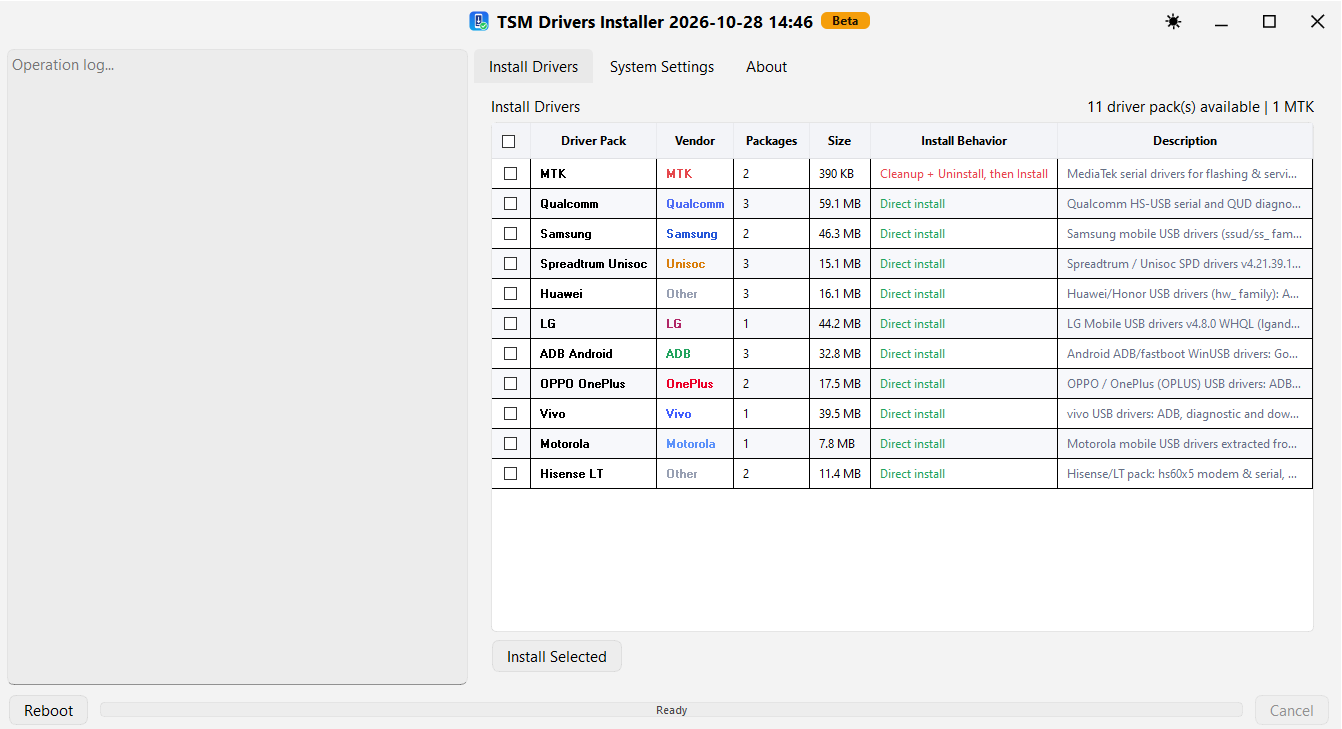
TSM Drivers Installer 2026 is a driver management utility designed to help mobile technicians install USB drivers for various smartphone brands and chipsets. The interface provides multiple driver packages in one place, making it easier to select and install the required drivers for mobile servicing, flashing, ADB, Fastboot, and diagnostic operations.
📱 TSM Drivers Installer — Overview
- Version: 2026 Beta
- Interface date: October 28, 2026
- Category: Mobile USB Drivers
- Platform: Windows
- Purpose: Smartphone driver installation and device connectivity
✨ Key Features
- Multiple mobile USB driver packages in one interface.
- Brand-specific driver selection and installation.
- Support for Android ADB and Fastboot connectivity drivers.
- MediaTek USB serial driver package for flashing and servicing workflows.
- Qualcomm HS-USB serial and diagnostic driver package.
- Spreadtrum / Unisoc SPD driver package.
- Samsung, Huawei, LG, OPPO, OnePlus, Vivo, Motorola, and other device driver packages.
- Operation log panel for monitoring installation activity.
- System settings and reboot options available in the interface.
📦 Available Driver Packages
- MediaTek (MTK)
- Qualcomm
- Samsung
- Spreadtrum / Unisoc
- Huawei
- LG
- ADB Android
- OPPO / OnePlus
- Vivo
- Motorola
- Hisense LT
🛠️ How to Use
- Download and extract TSM Drivers Installer if an official package is available.
- Run the installer with administrator privileges when required.
- Open the Install Drivers section.
- Select the driver package that matches your phone or chipset.
- Click Install Selected and follow the on-screen instructions.
- Check the operation log for installation results.
- Reconnect your device or restart Windows if required.
⚠️ Important Note
This release as a Beta version. Driver installation behavior may vary depending on Windows security settings, existing drivers, and the connected device. Create a restore point before changing system drivers and obtain packages from a trusted source.